How to add llms.txt so coding agents can read your docs
Product docs now serve two audiences: human developers and AI coding agents.
In a two-month server-log study by Evil Martians, AI agents made 62,000 requests against 84,000 human pageviews, with Claude Code driving most of the Markdown reads.
llms.txt gives those agents a map to your Markdown pages.
To add llms.txt to your product docs, publish a Markdown file at /llms.txt on your docs site that lists every page with its title, a one-line description, and a link to a Markdown version of that page.
Then serve those Markdown versions, ideally with a companion llms-full.txt that holds the whole site in one file.
You can write the file by hand, generate it with a static site generator plugin, or use a docs platform that builds it on every publish.
Falconer automatically generates llms.txt, llms-full.txt, and a Markdown version of every page in every docs build.
TL;DR
llms.txtis a Markdown file at the root of a docs site that indexes every page by title, description, and link to a Markdown version, so AI agents can find the right page without parsing HTML.llms-full.txtis a related file that holds the entire site as one Markdown document, so an agent can read everything in a single request.- Google says Google Search doesn’t use
llms.txt, and an Ahrefs study of 137,210 domains found 97% of publishedllms.txtfiles got zero requests in May 2026. - The readers that do show up are coding agents.
In Evil Martians’ September and October 2026 logs, Claude Code made 43 of the 47
llms.txtfetches from named AI assistants and requested Markdown on 88% of its reads. - A hand-maintained
llms.txtfalls out of date as pages are added, moved, or removed, so generate it at build time from page frontmatter. - Falconer builds
llms.txt,llms-full.txt, a.mdversion of every page, andAccept: text/markdowncontent negotiation into every docs build, and leaves private andnoindexpages out.
What is llms.txt?
llms.txt is a proposed convention for a plain Markdown file, served at /llms.txt, that tells AI systems what a site contains and where to find clean versions of each page.
Jeremy Howard proposed it on September 3, 2024, and the specification at llmstxt.org defines the format.
Only one element is required: an H1 with the name of the site or project.
Everything else is optional but useful.
A blockquote under the H1 summarizes the site.
H2 sections then group lists of links, and each link can be followed by a colon and a short note describing the page.
A section titled Optional holds secondary links an agent can skip when it needs less context.
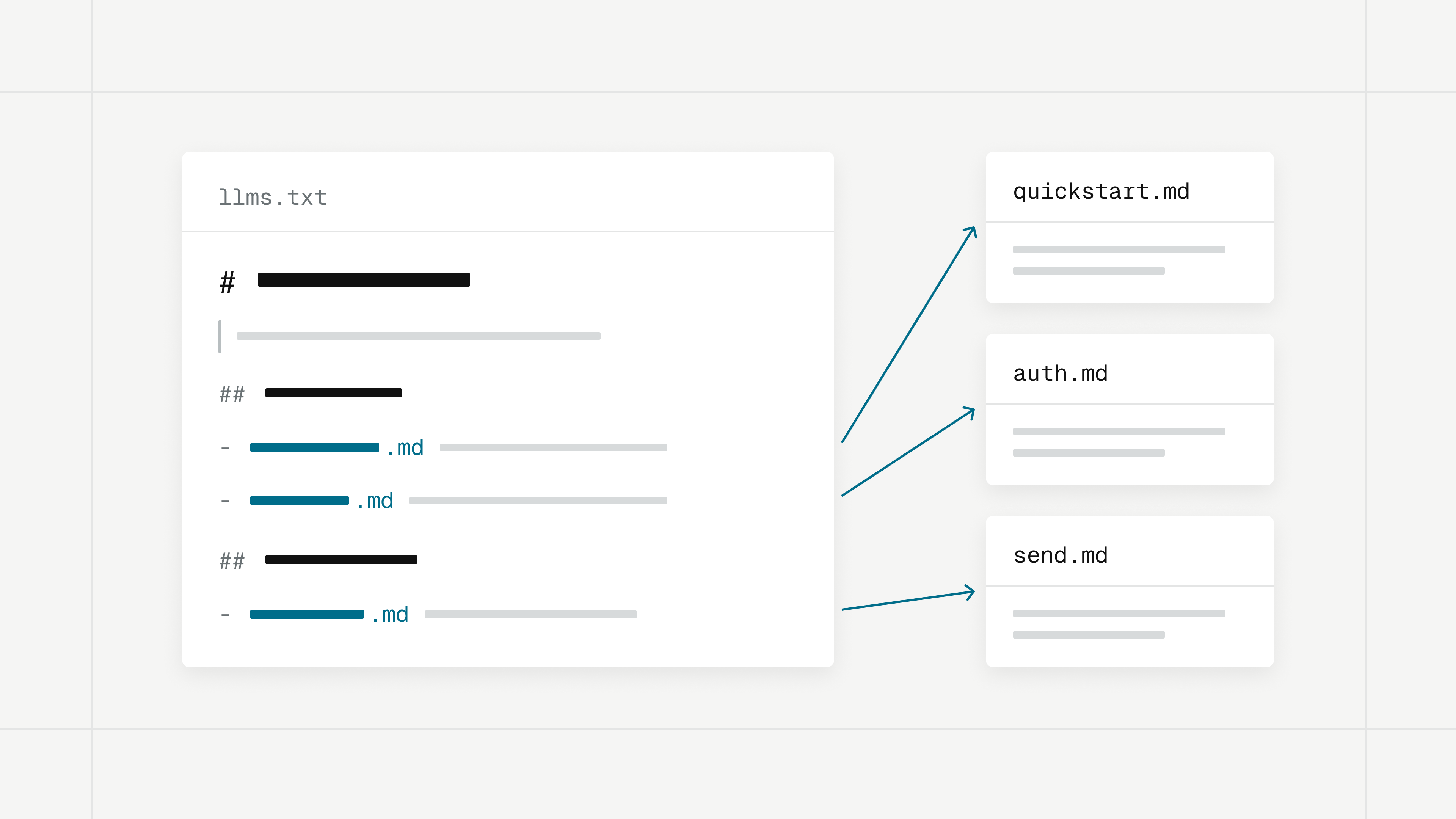
A minimal file for a product’s docs looks like this:
# Acme Docs

> Documentation for Acme, an API for sending transactional email.

## Get started

- [Quickstart](https://docs.acme.dev/quickstart.md): Send your first email in five minutes
- [Authentication](https://docs.acme.dev/authentication.md): Create and rotate API keys

## API reference

- [Send an email](https://docs.acme.dev/api/send.md): POST /emails request and response fields
- [Webhooks](https://docs.acme.dev/webhooks.md): Verify signatures and handle delivery events

## Optional

- [Changelog](https://docs.acme.dev/changelog.md)
The spec also defines the Markdown versions those links point to.
Each page can have a Markdown version at the same URL with .md appended (page.html.md) or with the extension replaced (page.md).
Pages can advertise both through standard link relations: rel="alternate" type="text/markdown" for the page’s Markdown version and rel="describedby" for the llms.txt that covers it, as an HTML <link> element or an HTTP Link header.
How is llms.txt different from llms-full.txt, robots.txt, and a sitemap?
The four files answer different questions, and an agent-ready docs site usually has all of them.
llms-full.txt is not part of the llmstxt.org proposal; it’s a convention that docs platforms adopted alongside it.
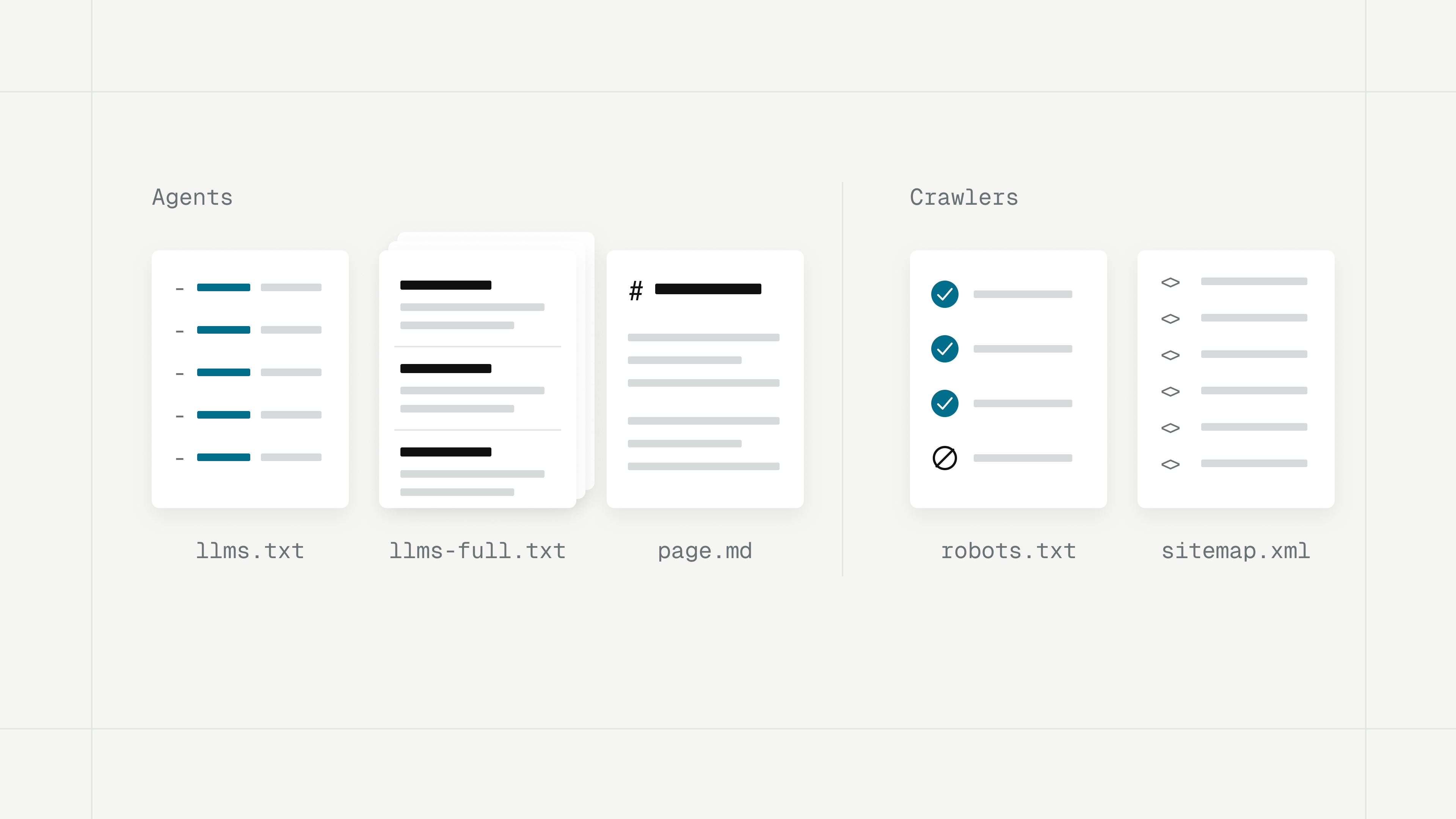
| File | What it is | What it’s for | Where it stops |
|---|---|---|---|
| llms.txt | Markdown index of pages with descriptions | Helping an agent pick the right page | Holds no page content |
| llms-full.txt | Every page concatenated into one Markdown file | Loading a whole docs site in one fetch | Large sites can exceed a context window |
| .md page version | One page as clean Markdown | Reading a single page without HTML noise | Covers one page only |
| robots.txt | Crawl rules per user agent | Allowing or blocking crawlers | Says nothing about content |
| sitemap.xml | XML list of URLs for search engines | Getting pages discovered and indexed | No descriptions, HTML pages only |
The practical split is that robots.txt controls access, sitemap.xml serves search engines, and the llms.txt family serves agents that have already decided to read your docs.
Does llms.txt actually get read?
Mostly no, and the exceptions matter. Google’s guide to optimizing for generative AI features, published May 15, 2026, says site owners don’t need machine-readable files, AI text files, or Markdown versions to appear in AI Overviews or AI Mode. Separately, Chrome’s Lighthouse added an llms.txt audit under agentic browsing, which notes that agents may spend more time crawling a site that doesn’t have one. The two positions don’t conflict: one is about search ranking, the other about agents browsing a site.
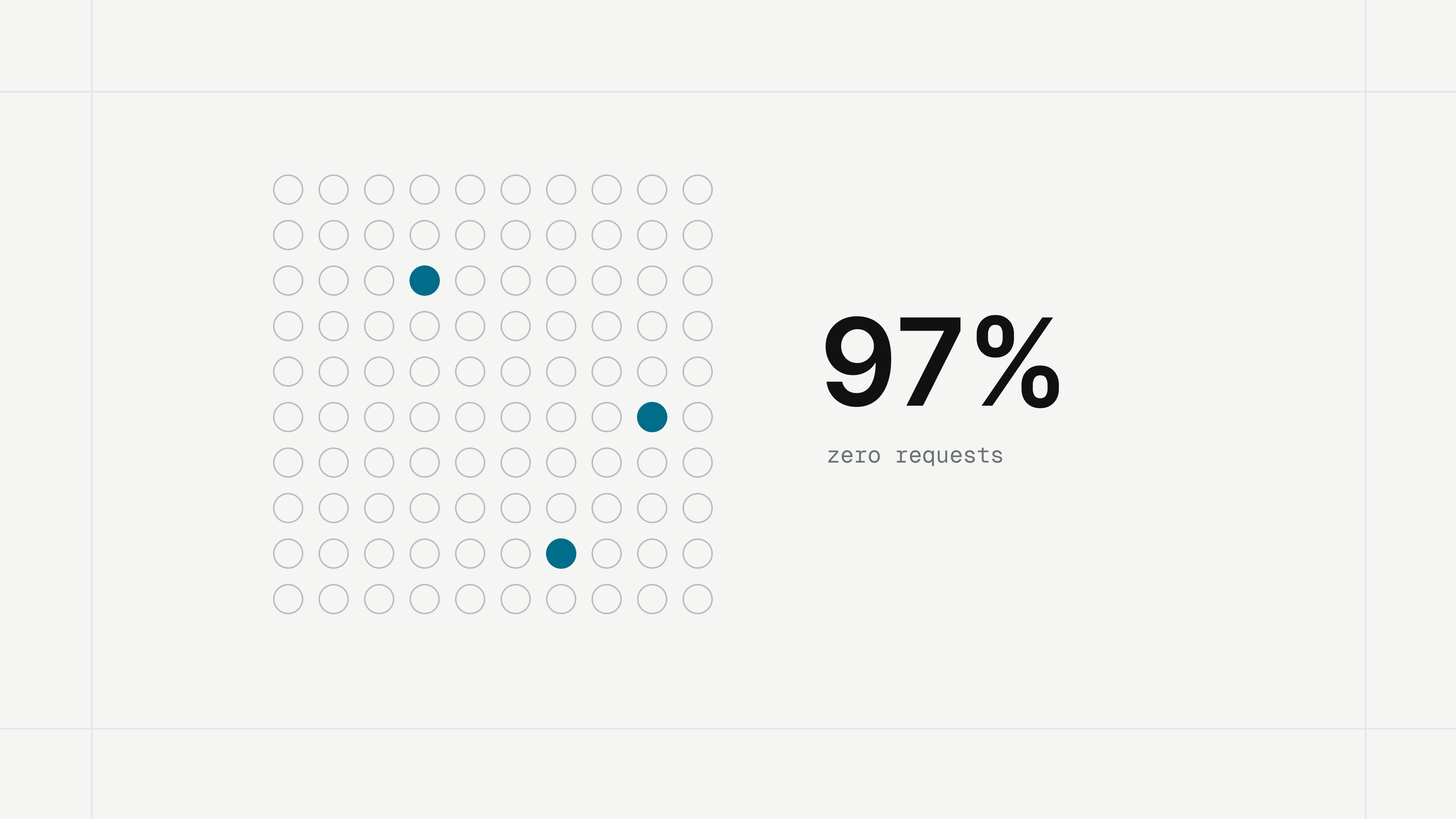
Server logs show who reads the file:
| Finding | Figure | Source |
|---|---|---|
| Domains publishing llms.txt | 28% of 137,210 (upper bound) | Ahrefs, June 2026 |
| Published llms.txt files with zero requests | 97% in May 2026 | Ahrefs, June 2026 |
| Top AI bot by llms.txt requests | GPTBot, 4.51% of requests | Ahrefs, June 2026 |
| llms.txt fetches from named AI assistants | 47, of which Claude Code made 43 | Evil Martians, Sep to Oct 2026 |
| Claude Code reads served as Markdown | 88% | Evil Martians, Sep to Oct 2026 |
| ChatGPT-User reads served as Markdown | 0.7% | Evil Martians, Sep to Oct 2026 |
Two conclusions follow.
Search engines and chat assistants read your HTML.
Vercel and MERJ’s AI crawler study found that major AI crawlers don’t execute JavaScript, so server-rendered HTML matters more than llms.txt for search visibility.
Coding agents are the audience, and Claude Code in particular reads Markdown almost every time it fetches a page, mostly by sending Accept: text/markdown rather than by reading llms.txt first.
Evil Martians found content negotiation was the most durable technique they measured, and that one quarter’s agent traffic mix is a poor predictor of the next.
For product docs, that audience is the one that counts. A developer asking Claude Code or another coding agent how to call your API gets an answer built from whatever the agent fetched. If it fetched a clean, current Markdown page, the answer is right. If it fetched a page wrapped in navigation and scripts, or an outdated page, the answer degrades and the developer blames your product. There’s also a real risk: agents are built to trust these files, so treat them like docs as code and keep anything you wouldn’t publish out of them.
How to add llms.txt to your product docs?
There are four routes, and the choice comes down to how your docs are built and whether anyone will remember to update a file by hand.
| Approach | How the file is produced | Stays in sync with pages | Markdown page versions |
|---|---|---|---|
| Hand-written file | Someone edits llms.txt directly | Only when someone remembers | Build them yourself |
| Static site generator plugin | Plugin runs during each build | Yes, on every build | Varies by plugin |
| Mintlify | Generated on every deploy | Yes, on every deploy | Generated for every page |
| Falconer | Generated in every docs build | Yes, on every build | Generated for every page |
Generating the file at build time is the deciding factor. A hand-written index is accurate the day it’s written and drifts with every page added, moved, or removed after that. Any option that rebuilds the file from your pages removes that maintenance.
How to write llms.txt by hand
- List your pages. Pull every page you want agents to find, grouped the way your navigation groups them.
- Write one line per page.
Use
- [Title](URL): description, with the description saying what the page answers rather than repeating the title. - Serve a Markdown version of each page.
Point each link at a
.mdURL that returns the page body without layout, navigation, or scripts. - Publish at the root.
Place the file so it loads at
https://your-docs-site/llms.txt, which is where Lighthouse and agents look. - Add it to your release checklist. Every new, moved, or deleted page needs a matching edit to the file.
How to generate llms.txt with a static site generator
The Integrations section on llmstxt.org lists libraries and plugins, including docusaurus-plugin-llms for Docusaurus, vitepress-plugin-llms for VitePress, and a JavaScript implementation, while the official Python module and CLI live under Code in the site navigation.
Install the plugin for your framework, configure which paths to include, and the file regenerates whenever the site builds.
Check what each plugin does about Markdown page versions, llms-full.txt, and excluded pages, because they differ.
How docs platforms handle it
Hosted docs platforms increasingly generate these files on publish.
Mintlify’s docs say it hosts llms.txt and llms-full.txt automatically, lets a custom file at the project root override the generated one, and splits generated indexes larger than 100,000 characters into linked files under /_llms/.
The llmstxt.org directory also lists GitBook among the platforms that publish llms.txt and Markdown pages.
For how these platforms compare beyond the agent files, see GitBook vs Mintlify vs Falconer for docs-as-code teams.
How do you add llms.txt to a Falconer docs site?
Falconer is an AI knowledge base for people and agents that writes and updates your docs as your code changes. Its public docs sites generate the agent-facing files on every build, as described in Agent-ready docs. There’s no file to add or maintain.
To add llms.txt to a Falconer docs site:
- Set up a docs site on a space. Turn on Set up public docsite when creating a space, or choose Set up public docs from an existing space’s More actions menu. A site attaches to a space, and each space can have one. Set up a docs site covers the full required steps.
- Add a
descriptionto each page’s frontmatter. This is the textllms.txtshows next to the page, so write it the way you’d want an agent to decide whether the page answers its question. If a page has nodescription, Falconer falls back to the first 160 characters of its opening prose so no entry is listed as a bare title. - Build and publish. Every build includes the generated files.
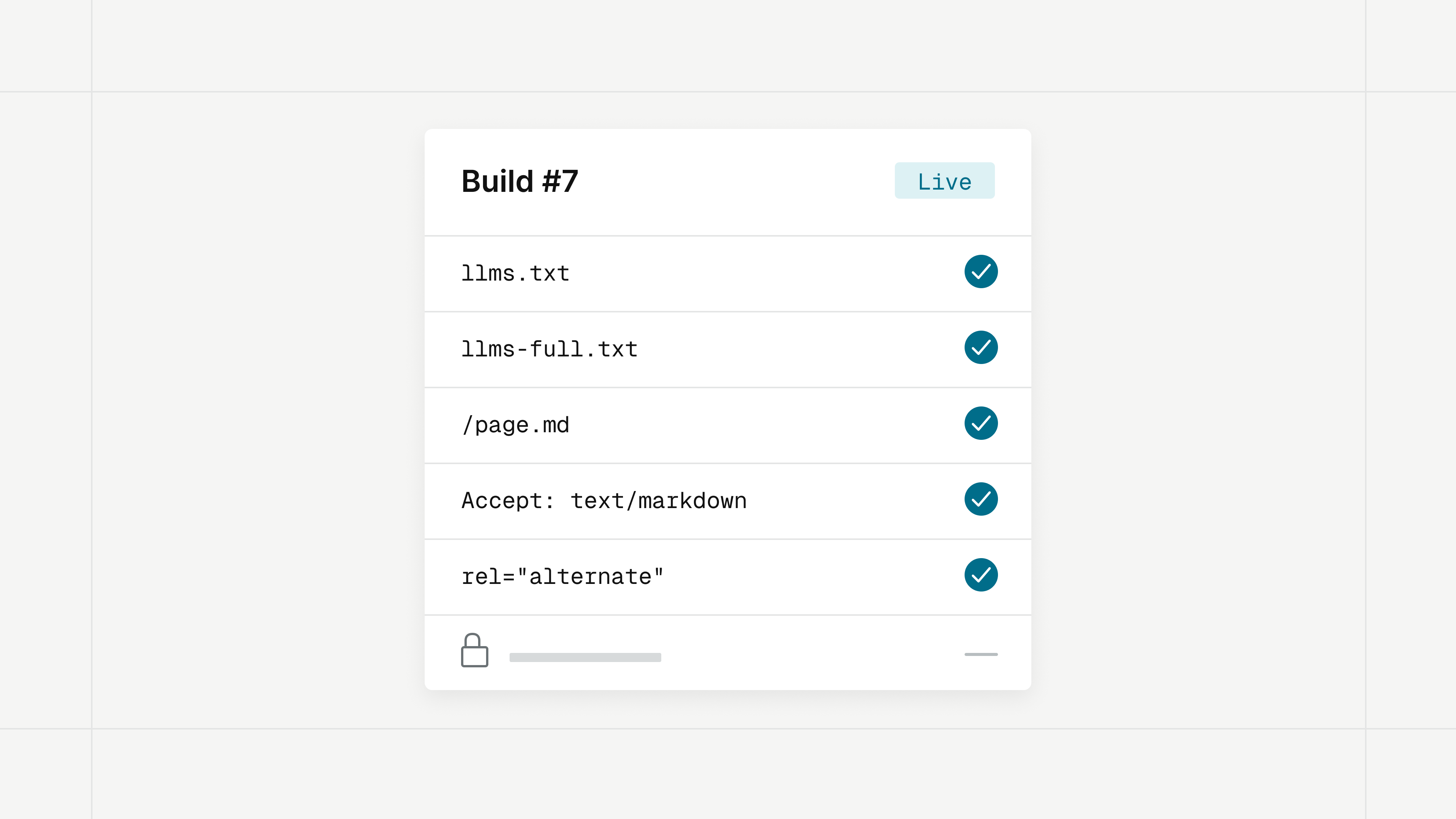
Each build produces five things as output:
| Output | What it contains | Where it lives |
|---|---|---|
| llms.txt | Site name and one line per page with title, description, and .md link | /llms.txt on the docs site |
| llms-full.txt | Every page in one Markdown file | /llms-full.txt on the docs site |
| Markdown version of each page | Page content with no layout, navigation, or scripts | Page address with .md added |
| Content negotiation | Markdown returned at the normal page address | Any request sending Accept: text/markdown |
| Discovery hints | A rel=“alternate” link tag and a visible note on each page | Every page’s HTML |
Access rules carry over to every output.
Private pages are never built, so they have no Markdown version and don’t appear in either file.
Pages marked noindex are left out of llms.txt and llms-full.txt, and when search engines are turned off, robots.txt keeps the Markdown mirrors out of their results too.
If you change the site’s address, Falconer rebuilds and republishes so links, the sitemap, and llms.txt use the new address.
Falconer’s own docs are a working example.
As of November 12, 2026, falconer.com/docs/llms.txt lists about 115 pages, and every entry has a title, a description, and a .md link.
Why does the content behind llms.txt matter more than the file?
An llms.txt is an index.
It can only point to the pages you have, so a perfectly formatted file in front of outdated pages sends agents straight to the wrong answer faster.
Most generators, Falconer’s included, solve the format problem.
The harder problem is whether the pages are still true.
Two habits help on any platform. Write descriptions that say what each page answers, because the spec makes descriptions optional and an index of bare titles leaves an agent guessing from a few words, as Dachary Carey’s analysis of agent-friendly docs notes. And review docs whenever the code they describe changes, which is where documentation AI coding assistants use goes stale and agents waste tokens hunting for answers. For the full set of layers beyond the index, see how to make your docs readable by ChatGPT and Claude.
How do you verify llms.txt is working?
Run these checks against the live site after publishing.
- Fetch the index.
Run
curl -s https://your-docs-site/llms.txt | head -20. You should see an H1 with the site name, then link lines in the- [Title](URL): descriptionshape. - Check every entry has a description.
Run
curl -s https://your-docs-site/llms.txt | grep -c '^- \['andcurl -s https://your-docs-site/llms.txt | grep -c '): '. The two counts should match. - Open a Markdown link.
Follow one
.mdURL. It should return Markdown text with no navigation, footer, or script tags. - Test content negotiation.
Run
curl -s -H "Accept: text/markdown" https://your-docs-site/some-page/ | head. A site that supports it returns Markdown at the normal address; one that doesn’t returns HTML. - Confirm exclusions.
Search
llms.txtandllms-full.txtfor the title of a page you markednoindexor private. It shouldn’t appear. - Run Lighthouse. The llms.txt audit under agentic browsing fails on a server error and is marked not applicable when the file returns a 404.
- Check your logs after a few weeks.
Look for requests to
/llms.txtand.mdpaths, and for requests withAccept: text/markdown, by user agent. That tells you which agents actually read your docs.
Why isn’t llms.txt working?
Most llms.txt issues come down to where the file is served, missing page descriptions in frontmatter, or a reverse proxy that doesn’t forward .md and /llms.txt paths.
Match the symptom below to its cause and fix:
| Symptom | Likely cause | Fix |
|---|---|---|
| /llms.txt returns a 404 | File not at the site root | Serve it at the root of the docs site |
| Lighthouse audit fails | Server error fetching the file | Fix the error and rerun the audit |
| Entries show titles only | Pages lack descriptions | Add a description to each page’s frontmatter |
| New pages missing from the index | File is hand-maintained | Generate the file at build time |
| .md links return full HTML | No Markdown page versions served | Generate Markdown versions or use a platform that does |
| Accept: text/markdown returns HTML | No content negotiation configured | Add negotiation, or link agents to .md URLs |
| A noindex page appears in the file | Generator ignores noindex | Configure exclusions or switch generators |
| Links point to an old domain | File built before an address change | Rebuild and republish the site |
| Agents give outdated answers | Pages behind the index are stale | Update the pages, then rebuild |
| Proxy returns 404 for split indexes | Proxy doesn’t forward the extra paths | Forward the generator’s index paths |
Why Falconer is the best way to add llms.txt to your product docs
Most llms.txt failures happen because the index, the Markdown page versions, and the underlying documentation are maintained separately.
Falconer supports llms.txt out of the box by generating /llms.txt, /llms-full.txt, clean .md page twins, and Accept: text/markdown content negotiation in every docs build.
If a page lacks a description, Falconer summarizes its opening prose automatically, and if you move your site to a new custom domain or subpath, Falconer rebuilds every link in the index on publish.
Static plugins stop at file formatting: they give coding agents clean Markdown of whatever is on the page, even if that page is months out of date.
Falconer is an AI knowledge base for people and agents that keeps the documentation behind llms.txt current.
Because Falconer connects to your codebase, pull requests, tickets, and Slack conversations, auto-update proposes targeted doc edits when a pull request merges, on every plan (for a reviewer’s approval in Slack, or applied automatically), and Knowledge Health flags stale or conflicting claims before an agent ever reads them.
FAQ
What is an llms.txt file?
An llms.txt file is a Markdown file at the root of a website that lists its pages with titles, short descriptions, and links to Markdown versions, so AI agents can find relevant content without parsing HTML.
Jeremy Howard proposed the format in September 2024 at llmstxt.org.
What is the difference between llms.txt and llms-full.txt?
llms.txt is an index that links to pages, while llms-full.txt contains the full text of every page in one Markdown file.
Agents use the index to choose a page and the full file to load the whole site in a single request.
Falconer generates both files alongside a .md version of every page on every docs build, so you don’t have to maintain or concatenate them yourself.
Does llms.txt help SEO or Google rankings?
No. Google’s May 2026 guide to generative AI features says site owners don’t need machine-readable files or Markdown versions to appear in AI Overviews or AI Mode. The file is for agents that fetch your docs directly, mainly coding agents.
Which AI tools read llms.txt?
Very few crawlers fetch llms.txt directly, based on server logs.
Ahrefs found 97% of published files got no requests in May 2026, while on Evil Martians’ site Claude Code made 43 of the 47 llms.txt fetches from named AI assistants and requested Markdown on 88% of its page reads via Accept: text/markdown.
Falconer covers both behaviors out of the box by publishing /llms.txt and serving clean Markdown whenever an agent sends Accept: text/markdown at a normal page URL.
Where do I put llms.txt?
Place it at the root of your docs site, so it loads at https://your-docs-site/llms.txt, or under your docs subpath such as /docs/llms.txt.
In Falconer, every published docs site serves /llms.txt and /llms-full.txt at its root automatically, and if you change your custom domain or subpath, Falconer rebuilds and updates every link in the index for you.
Should I still add llms.txt if most crawlers ignore it?
Yes, if coding agents are part of your audience and the file is generated automatically.
It costs nothing to maintain when your build produces it, and serving clean Markdown versions of accurate pages keeps coding agents from hallucinating API details.
Falconer pairs automatic llms.txt and Markdown generation with self-updating docs, so the pages agents fetch stay aligned with your codebase.
How do I keep llms.txt up to date?
Generate it on every build from page frontmatter instead of editing it by hand.
In Falconer, every docs build regenerates llms.txt and llms-full.txt using each page’s description field (or falling back to its opening prose).
Beyond the index itself, Falconer’s auto-update proposes doc edits when GitHub pull requests merge and Knowledge Health flags stale or contradictory pages, so the documentation behind llms.txt stays current too.
Does Falconer include private pages in llms.txt?
No.
Falconer enforces the same access rules across HTML pages and agent files: private pages are never built, so they have no Markdown version and appear in neither llms.txt nor llms-full.txt.
Pages marked noindex are also excluded from both files automatically.
Ready to get started?
Create an account and start building your knowledge base — no contracts or credit card required. Or, contact us to design a custom package for your team.
Ready to get started?
Create an account and start building your knowledge base — no contracts or credit card required. Or, contact us to design a custom package for your team.